Understand the config as you edit
The plugin recognizes HAProxy config files, understands their sections and references, and keeps editor assistance aligned with the HAProxy version selected for the project.
Edit HAProxy configuration files with navigation, completion, inspections, and validation built into your JetBrains IDE. Catch invalid directives and broken backend or ACL references before reloading HAProxy.
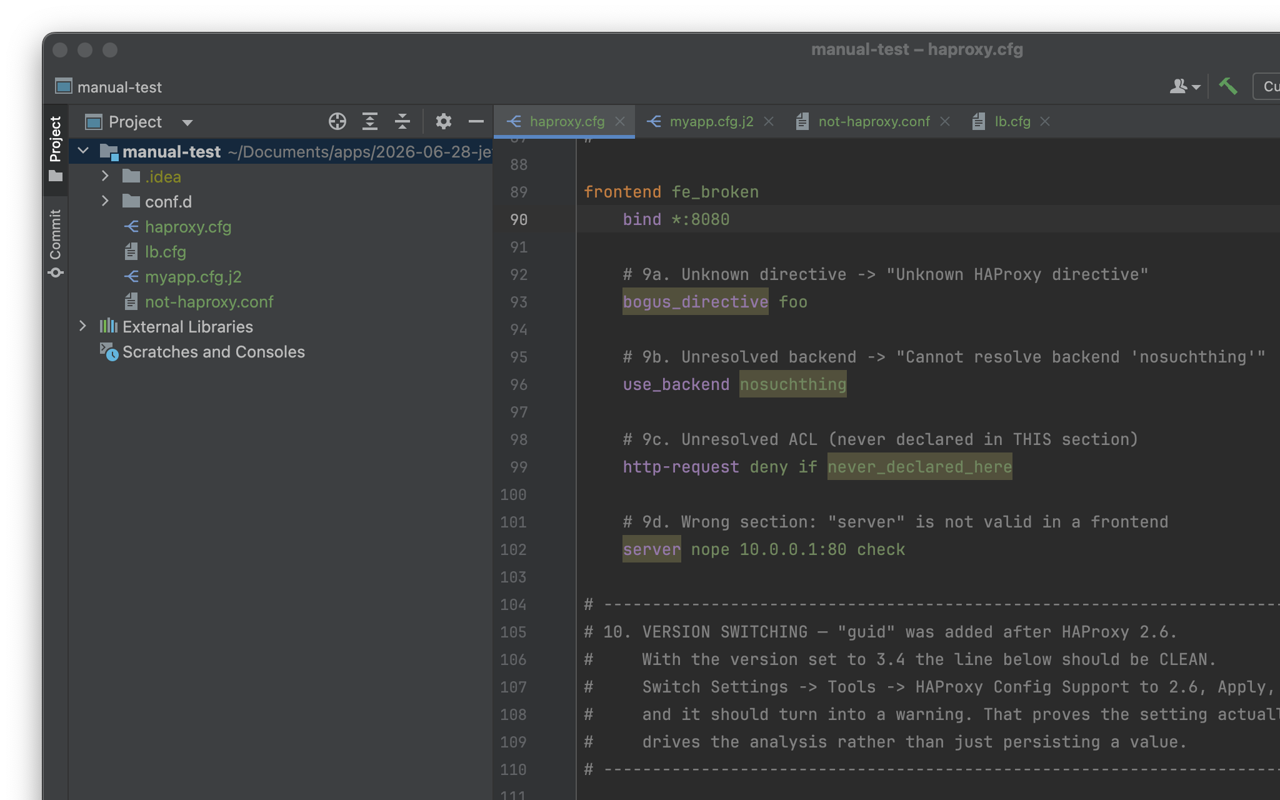
The plugin recognizes HAProxy config files, understands their sections and references, and keeps editor assistance aligned with the HAProxy version selected for the project.
Recognizes haproxy.cfg, haproxy.conf, *.haproxy, common templates, and convincingly detected HAProxy configs. The structure view lists global, defaults, frontend, backend, listen, resolver, peer, and userlist sections.
Ctrl-click backend and ACL references, find their usages, and rename them safely. Backend and listen declarations can be resolved across the project files configured for the deployment.
Complete directives that belong in the current section and target HAProxy version. Backend and ACL names are suggested where they can be referenced.
See unknown directives, wrong-section usage, unresolved backend or ACL references, and directives unavailable in the selected HAProxy version.
Open directive help from the editor with Quick Documentation or a documentation hover, without leaving the file you are working in.
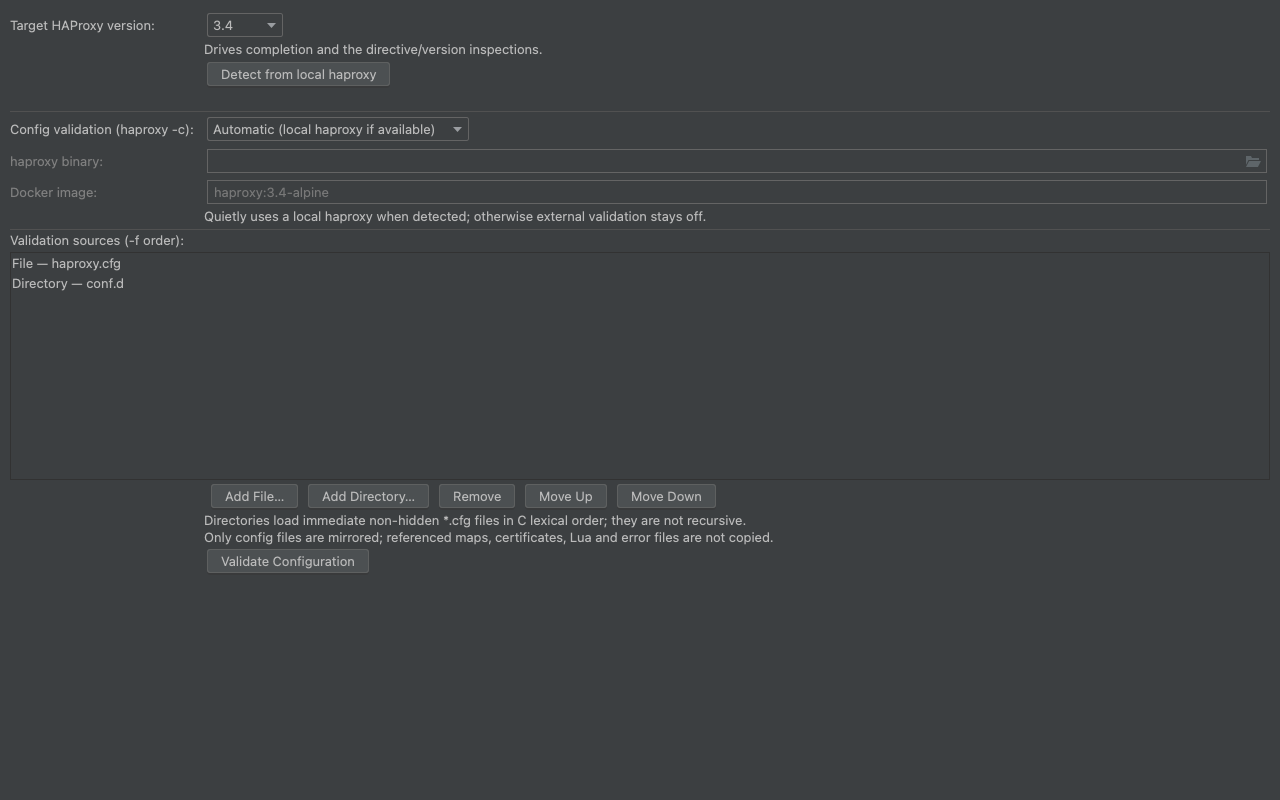
Run haproxy -c with an installed HAProxy binary. Automatic mode quietly uses a local installation when one is available and otherwise leaves external validation off.
Add ordered project-relative files and directories using the same order as repeated HAProxy -f arguments. Errors from a multi-file run appear in the correct editor.
Use a Docker image pinned to the target version when local HAProxy is not suitable. Images are never pulled automatically, mounts are read-only, and containers run without network access.
Install HAProxy Config Support from JetBrains Marketplace, then open a recognized config such as haproxy.cfg, haproxy.conf, or a *.haproxy file. Common template names and custom-named files with clear HAProxy content are also detected.
Open Settings → Tools → HAProxy Config Support and choose HAProxy 2.6, 2.8, 3.0, 3.2, or 3.4. If HAProxy is installed locally, use auto-detect to read the version from haproxy -v. Completion and inspections update for that version.
Automatic quietly uses a detected local HAProxy. Disabled starts no external process. Local HAProxy binary uses the configured path or resolves haproxy from your PATH. Docker image is opt-in and runs a pinned, network-less container. Syntax highlighting and built-in inspections remain available in every mode.
Leave validation sources empty to validate the current file. For a split configuration, add project-relative files or directories in the same order HAProxy receives its repeated -f arguments. The plugin preserves unsaved editor text in a private temporary workspace and maps each diagnostic back to its source file.
HAProxy Config Support has no account, credentials, telemetry, analytics, or runtime network calls. Project settings remain in your IDE. Optional validation starts only local processes, and Docker validation is explicitly enabled per project.
IntelliJ IDEA, WebStorm, PyCharm, GoLand, PhpStorm, Rider, RubyMine, CLion, DataGrip, and other compatible IntelliJ-platform IDEs on build 2024.1 or newer.
Directive data is bundled for HAProxy 2.6, 2.8, 3.0, 3.2, and 3.4. Select the version used by the project so completion and compatibility inspections use the right branch.
No. Highlighting, structure view, navigation, completion, quick documentation, and inspections work without an HAProxy binary. An installed binary is needed only for optional haproxy -c validation. Docker validation is available as an explicit alternative.
Add files and directories under Settings → Tools → HAProxy Config Support in deployment order. Backend and listen navigation, completion, usages, and rename span that configured set. ACLs remain local to the section where they are declared.
No. The plugin never pulls an image. The selected image must already exist locally, and the validation container runs with networking disabled and the temporary config workspace mounted read-only.
The plugin explains the problem once and keeps editor features running. A missing binary, Docker installation, or image never blocks editing or the built-in inspections.
The current release is free to install and use, with no account or license key.